CMOS micro laser displacement sensor
product presentation
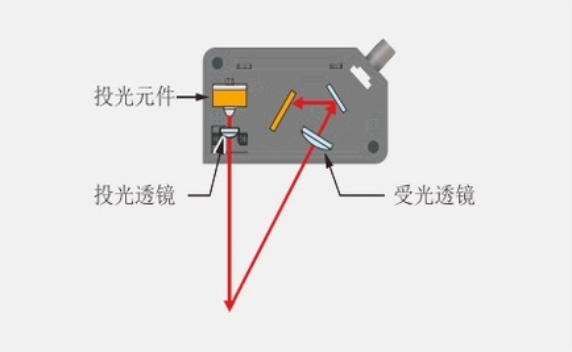
New high precision optical structure
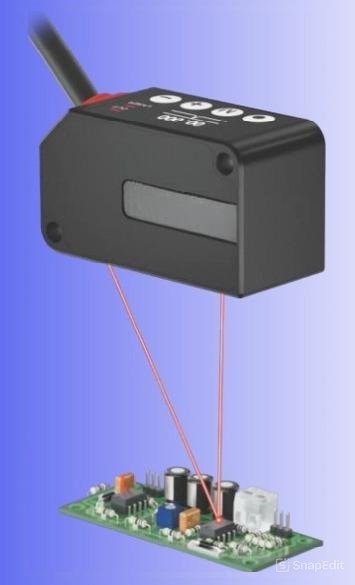
The new optical system achieves excellent measurement accuracy while reducing the size of the sensor. The built-in mirror optical system provides an excellent measurement experience, maintaining high levels of accuracy even in small devices.
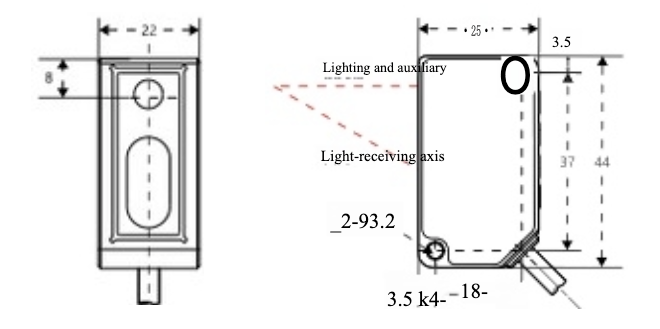
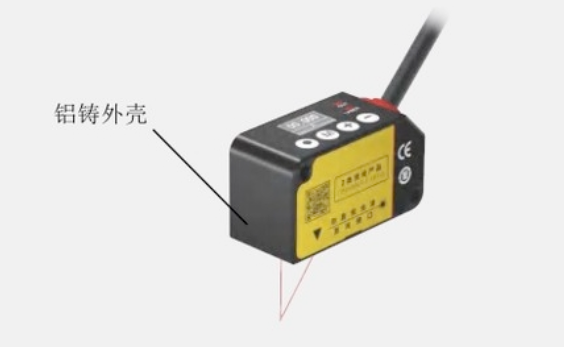
Compact, lightweight exterior design
The aluminum cast shell is used to achieve small size of the body while ensuring the robust and durable sensor structure.
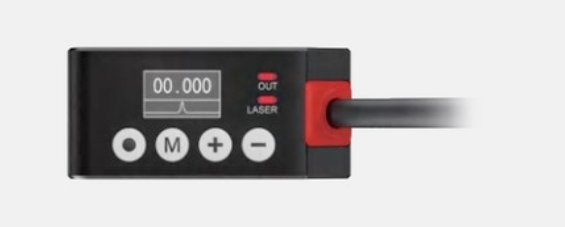
Convenient interface
The OLED display is configured to ensure a clear view in all directions, and the thin film keys are simple and convenient to operate, with more stable protection performance.
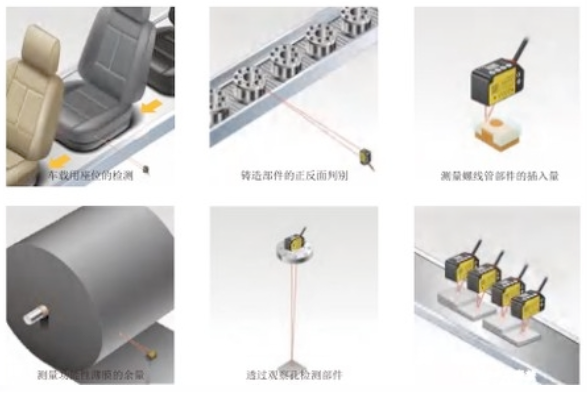
Product Introduction
The measurement range from 25mm to 600mm covers a wide range of applications and can meet the needs of different industries and fields.
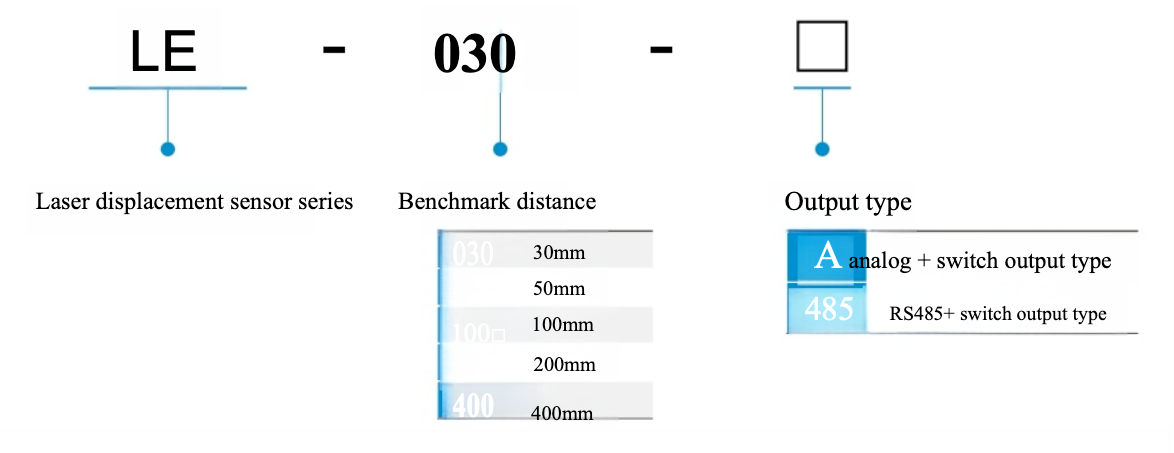
Product model
| Model | Analog + switch quantities | LE-030-A to LE-800-A | ||||||
|---|---|---|---|---|---|---|---|---|
| LE-030-A | LE-050-A | LE-100-A | LE-200-A | LE-400-A | LE-800-A | |||
| Model | LE-030-485 | LE-050-485 | LE-100-485 | LE-200-485 | LE-400-485 | LE-800-485 | ||
| RS-485 + switch quantity | ||||||||
| Benchmark distance | 30mm | 50mm | 100mm | 200mm | 400mm | 800mm | ||
| Measuring range | ±5mm | ±13mm | ±35mm | ±80mm | ±200mm | ±350mm | ||
| Linear precision | ±0.1% F.S. (F.S. = 10mm) | ±0.1% F.S. (F.S. = 70mm) | ±0.15% F.S. (F.S. = 160mm) | ±0.3% F.S. (F.S. = 400mm) | ±0.65% F.S. (35mm ~ 400mm) ±1.5% F.S. (400mm ~ 800mm) |
|||
| Repeat accuracy | 1 μm | 2 μm | 4 μm | 10 μm | 20 μm | 100 μm | ||
| Spot definition | Φ50 μm | Φ70 μm | Φ140 μm | Φ290 μm | Central 580 μm | Central 800 μm | ||
| Illuminant wavelength | Red semiconductor laser 655nm | |||||||
| Illuminant maximum output | 1mW | |||||||
| Laser class (GB/IEC) | Class 2 | |||||||
| Sampling period | AUTO / 500μs / 1ms / 2ms / 4ms / 8ms / 16ms | AUTO / 1ms / 2ms / 4ms / 8ms / 16ms / 32ms / 64ms | ||||||
| Temperature characteristics (reference value) | ±0.05% F.S. / °C | |||||||
| RS485 communication specifications | Half-duplex | |||||||
| External input functions | Measurement hold / peak hold / peak-to-peak hold / valley hold / average hold / trigger upload / laser switch | |||||||
| Switching output | The collector is open circuit NPN or PNP, maximum 100mA/DC30V, residual voltage 1.8V | |||||||
| Analog current | 4-20mA, allowable load resistance below 300Ω | |||||||
| Analog voltage | 0-5V, output impedance 100Ω | |||||||
| Supply voltage | DC12-24V ±10% (pulsation P-10% below) | |||||||
| Consumed current | Below 80mA | |||||||
| Guard circuit | Reverse protection, overcurrent protection, short circuit protection | |||||||
| Levels of protection | IP67 | |||||||
| Use temperature / humidity | -10~50°C / 35~85%RH (no condensation and ice) | |||||||
| Storage temperature / humidity | -20~60°C / 35~85%RH (no condensation and ice) | |||||||
| Ambient light (illuminance) | Incandescent: below 3000LX | |||||||
| Vibration resistance | 10-55Hz double amplitude 1.5mm X, Y, Z direction each 2 hours | |||||||
| Resistance to shock | 500m/s² (about 50G) X, Y, Z direction each 3 times | |||||||
| Shell / Material | Shell: Die-cast Aluminum | |||||||
| cable | 2m,6-core wire | |||||||
| weight | About 85g (including cable) | |||||||
Note 1: The data of the standard target (white non-glossy ceramic) measured at the reference distance, with a sampling period of 1ms and an average of 32 times.
Note 2: The data is measured for the standard target object (white non-glossy ceramic).
Note 3: The value at the reference distance. If there is light leakage outside the defined range, and the reflectivity around the detection point is higher than that of the detection point itself, the result may be affected.
Note 4: The laser classification of FDA (CDRH) is based on IEC 60825-1:2014 and implemented in accordance with Laser Notice No.50.
Model analysis
Fundamental Settings
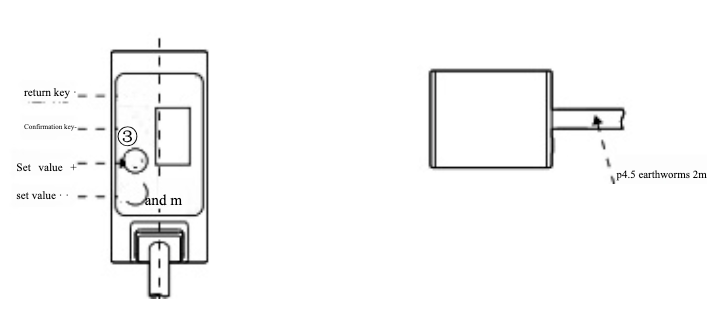
Use [+] and [-] to switch between different items. Use [M] to enter the lower menu, set and confirm, and return to the higher menu.
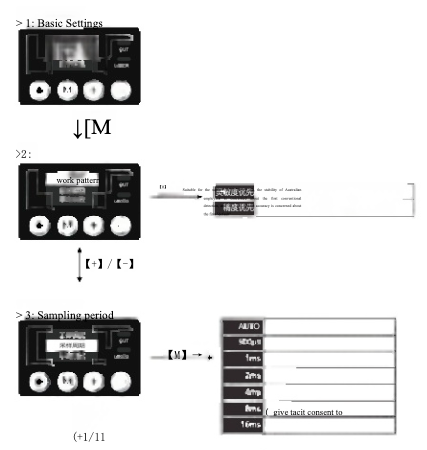
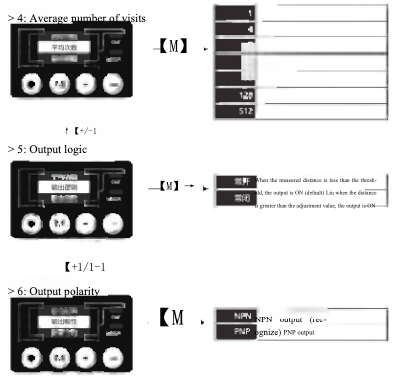
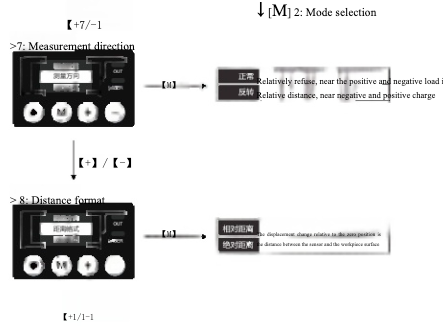
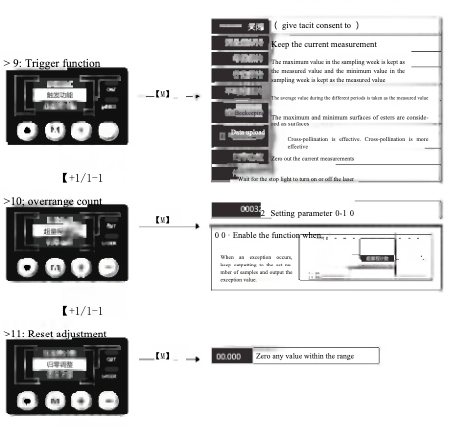
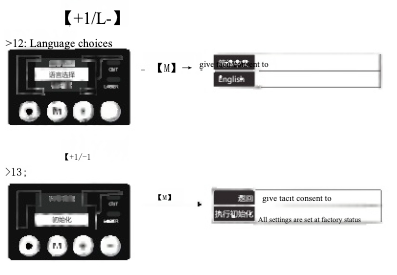
Product Basic Function Setting
explain :
After the instruction is completed, return to the main interface and make fine adjustments to the threshold as follows:
- Short press [+] or [-] to enter threshold Check (flashing);
- Long press [+] or [-] to quickly adjust the threshold;
- No operation within 2 seconds, the setting is successful and exits automatically;
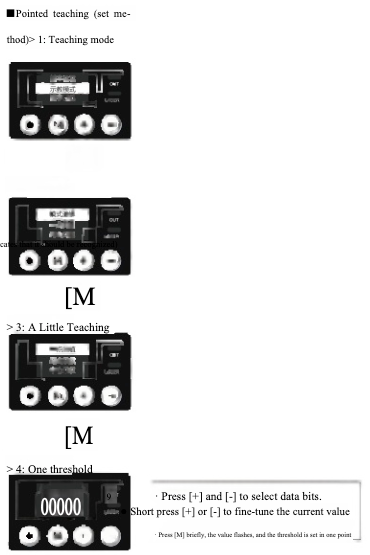
Two-point demonstration (set method)
A > 1: Two-point teaching
【M】 >2: One threshold
- At the same time, select data bits according to [+] and [-].
- Short press [+] or [-] to fine-tune the current value
- Press [M] to complete the one-point threshold setting
[M]> 3: Two-point threshold
- At the same time, select the display bit according to [+] and [-]
- Short press [+] or [-] to fine-tune the current value
- Press [M] to complete the two-point threshold setting
Note: After the central teaching is completed, you can fine-tune the threshold by the following operations after returning to the main interface:
- Short press [+] to enter the one-point threshold Check (flashes), long press [+] or [-] to quickly adjust;
- Short press [-] to enter two-point threshold Check (flashing), long press [+] or [-], can be quickly adjusted;
- No operation within 2 seconds, the setting is successful, and automatically exits;
Central demonstration (setting method)
A >1: Central teaching (Two way display)
A 【M】 > 2: Central threshold
- At the same time, select the display bit according to [+] and [-]
- Short press [+] or [-] to fine-tune the current value
- Short press [M], the value flickers, and the central threshold is set
【M】 > 3: Central difference
【M】 > 4: Central difference setting
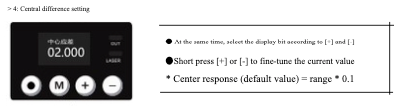
- At the same time, select the display bit according to [+] and [-]
- Short press [+] or [-] to fine-tune the current value
- Center response (default value) = range * 0.1
Note: After the central teaching is completed, you can fine-tune the threshold by the following operations after returning to the main interface:
- Short press [+] or [-] to enter threshold Check (flashing);
- Long press [+] or [-] to quickly adjust the threshold;
- No operation within 2 seconds, the setting is successful and exits automatically;
Lag phenomenon/output
delay> 1: Lag phenomenon
Mean value = measurement × 0.1% . [M] Set the full tolerance setting value. If the measured value fluctuates due to the need of the object and the output is repeatedly ON/OFF, the lag value can be increased to stabilize the ON/OFF.
t+1/L-】 > 2: Delayed output
Regulation of heat 【M】 (Default) delay of 5 ms Delay 5ms Delay 5ms
Detailed explanation of teaching model
The following three teaching modes switch between normally open and normally closed outputs through the [Output polarity] in the basic Settings. The following are the actions set to [normally open].
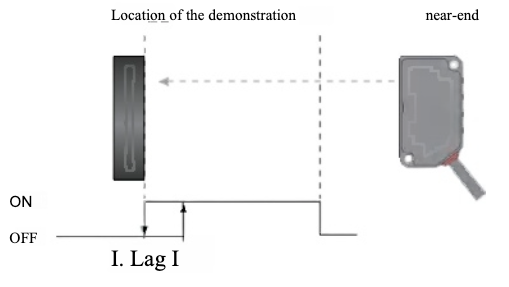
Pointers
After teaching at the specified position, output ON in the range between that position and the proximal end of the detection range.
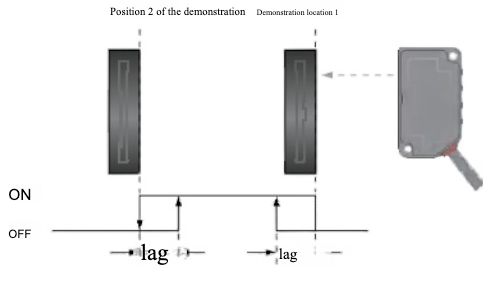
Two-point demonstration
After the two points are designated for teaching, the ON is output in the range between the two points.
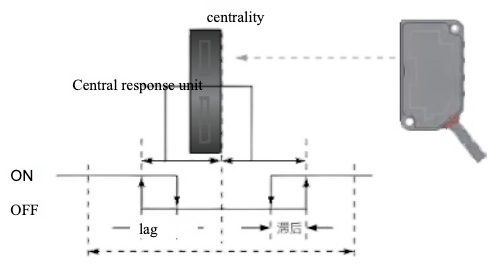
Central demonstration
After teaching in the specified position, ON is input when the distance is outside the range of [Center Aberration] at that position. When there is a workpiece on the base position (such as conveyor belt) that needs to be detected, center indication mode is used.
Basic Product Function Setting
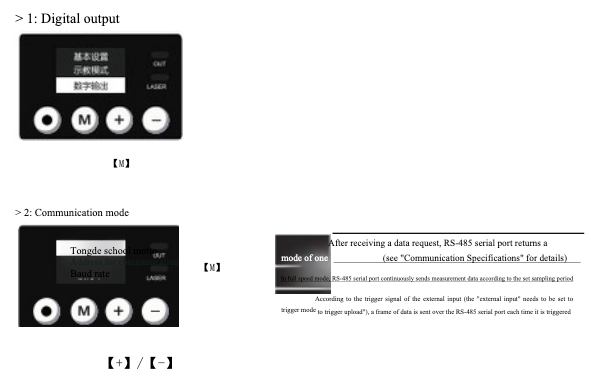
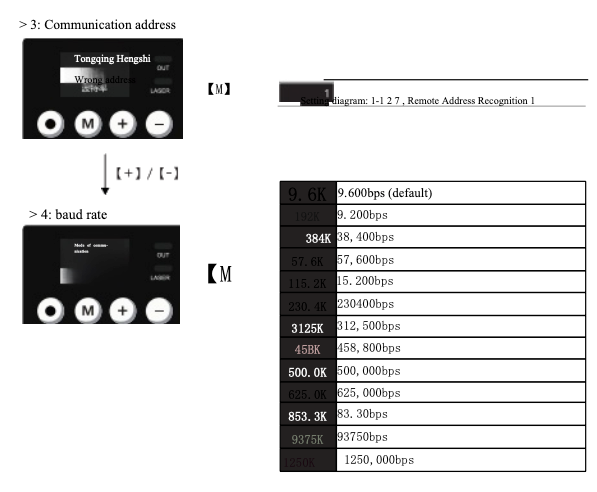
Digital output (RS-485)
Switch between different items by using [+] and [-], and press [M] to enter the lower menu to set and confirm, and return to the upper menu,
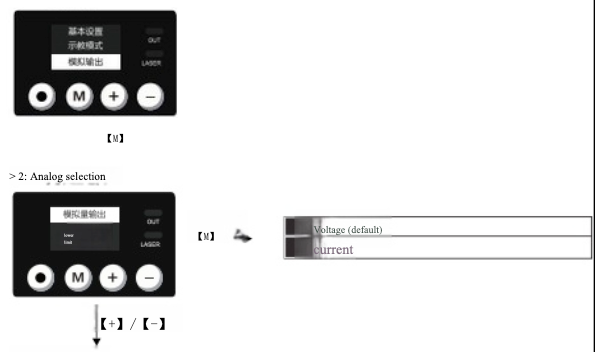
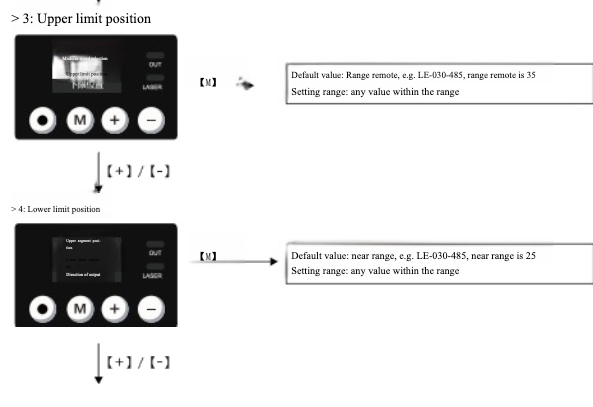
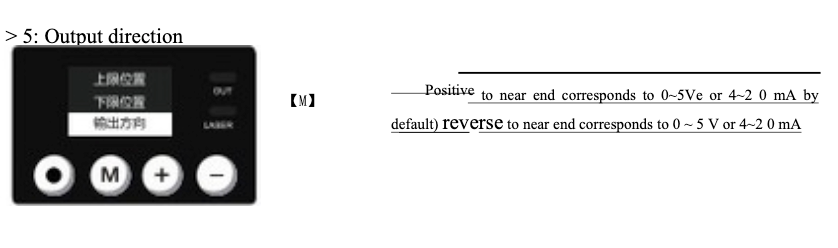
Analog output (V/A)
Switch between different items by using the [+] and [-] keys. The [M] key is used to enter the lower menu, set and confirm, and return to the upper menu
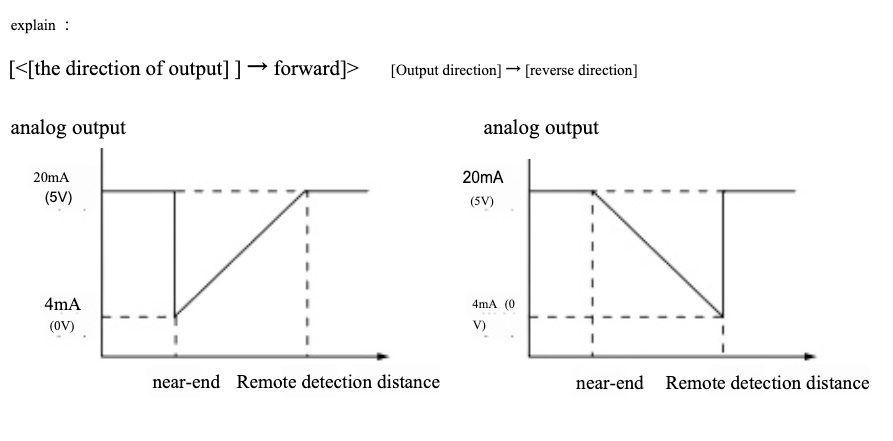
Other functions
Reset function
Reset settings
In the detection mode, long press [] for more than 2 seconds to execute the zero setting. At this time, the current measurement value is displayed as [0.000]. (The decimal point is different in different models)
Cancel zero reset setting
In detection mode, hold down [·] for more than 4 seconds to cancel the zero setting.
Communication specifications
| Parameter | Value / Description |
|---|---|
| Communication mode | RS-485 half-duplex |
| Communicating protocol | Modbus RTU |
| Chinaprotocol | Binary system |
| Baud rate | 9600 bps (recognised) |
| Check bit | NONE |
| Data long seat | 8bit |
| Stop bit | 1bit |
Distance values read
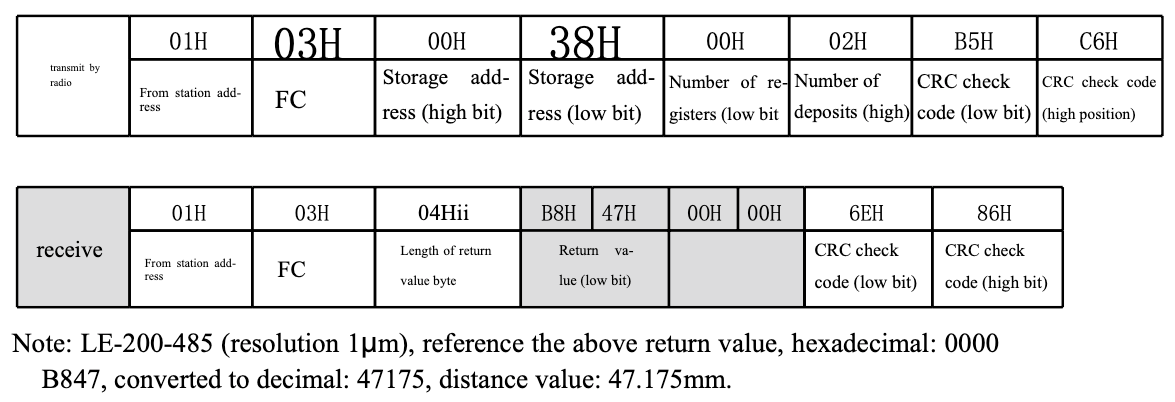
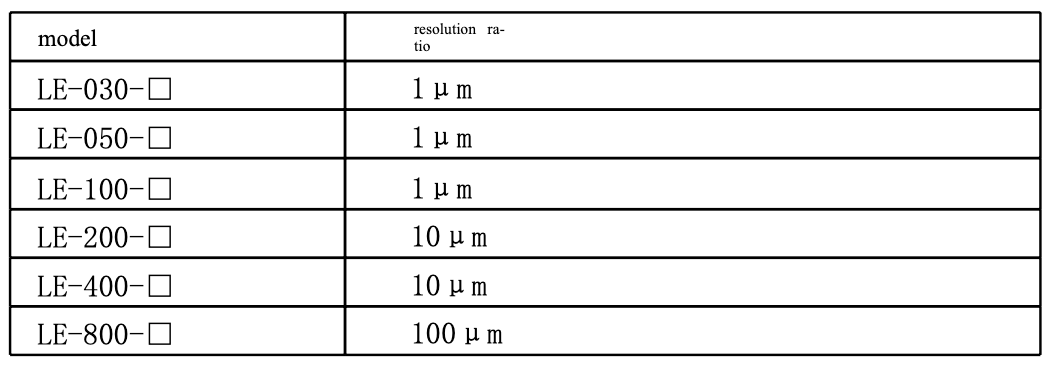
Resolution references
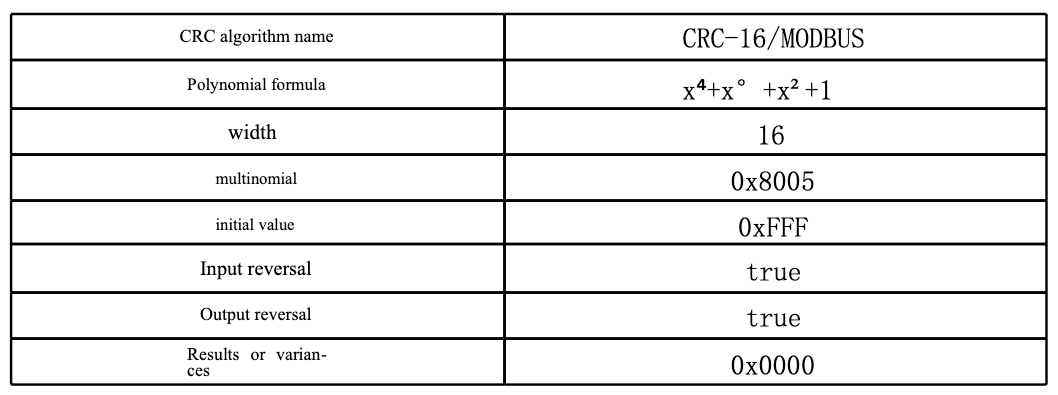
CRC algorithm verification method
Product basic function setting
Command (write/read) data table
| Name | FC | Register address (high) | Register address (low bit) | Number of registers | Parametric description | Read instructions | Return |
|---|---|---|---|---|---|---|---|
| Sampling period | 03H / 06H | 00H | 01H | 1 |
0001 : 500 μs 0002 : 1ms 0003 : 2ms 0004 : 4ms 0005 : 8ms 0006 : 16ms 0007 : AUTO |
01030001 D5 CA | 0103020003F845 |
| Average time | 03H / 06H | 02H | 01H | 1 |
0000 : 1 0001 : 8 0002 : 16 0003 : 32 0004 : 128 0005 : 512 |
01030002 000125 CA | 01030200023985 |
| N. O. / N. C. | 03H / 06H | 00H | 04H | 1 |
0000 : N. O. 0001 : N. C. |
01030004 0001 C5 CB | 0103020000 B844 |
| NPN / PNP | 03H / 06H | 00H | 05H | 1 | 0o : P | 01030005 0001940B | 0103020000 B844 |
| Measure direction | 03H / 06H | 00H | 03H | 1 |
000 : Normal 0001 : Reverse |
01030003 0001740A | 0103020000 B844 |
| Data format | 03H / 06H | 00H | 3DH | 9 | A to Z | 0103003D 000115 C6 | 0103020000 B844 |
| External input | 03H / 06H | 00H | 06H | 1 |
000: Off 0001: Data upload 0002: Measure value maintained 003: Bee value maintained 004: Valley holds 0005: Average kept 0006: Peak-to-peak hold 007: Zeroing function 0008: Stop lighting |
01030006 0001640B | 01030200 00 B844 |
| Over-reading count | 03H / 06H | 00H | 07H | 2 | 32 (0 ~ 10000) | 01030007 000275 CA | 01030400200000 FB F9 |
| Diagrammatic model | 03H / 06H | 00H | 09H | 1 |
000: One point of instruction 0001: Two-point teaching 0002: Central teaching |
01030009 0001540B | 0103020000 B844 |
| Make zero adjust | 05H | 00 | 02 | 0xFFF | 01050002 FF002D FA | ||
| Cancel make zero | 05H | 00 | 02 | 0x0000 | 01050002 00006C 0A | ||
| Initialise | 05H | 00 | 03 | 0x0003 | 01050003 FF FF 3C 7A | ||
| Λ threshold | 03H / 06H | 00H | 0AH | 2 | Within range (pm) | 0103000A 0002 E409 | 010304AE 61000A 0B 02 |
| 2 o'clock threshold | 03H / 10H | 00H | 0CH | 2 | Within range (μm) | 0103000C 00020408 | 0103047E 63 EC F0000E |
| centrality threshold | 03H / 10H | 00H | 0EH | 2 | Within range (μm) | 0103000E 0002 A5C8 | 010304 AE 60000A 5 A C2 |
| centrality accept on assignment | 03H / 10H | 00H | 10H | 2 | Within the range (μm) | 01030010 0002C5 CE | 01030486 A00001 1299 |
| hysteresis phenomenon | 03H / 10H | 00H | 12H | 2 | Within the range (μm) | 01030012 0002640E | 010304C3500000 C666 |
| Delayed output | 03H / 10H | 00H | 14H | 1 |
000: Turn off 0001 delayed on 0002: Delayed 0003: Single delay |
01030014 0001 C40E | 0103020000 B844 |
| communication address | 03H / 10H | 00H | 15H | 1 | 1 ∼ 8 | 01030015 000195 CE | 010302000017984 |
| Baud rate | 03H / 10H | 00H | 16H | 1 |
0000 : 9600 0001 : 19200 0002 : 38400 0003 : 57600 0004 : 115200 0005 : 230400 0006 : 315200 0007 : 460800 0008 : 500000 0009 : 625000 000A : 833333 000B : 937500 000C : 1250000 |
01030016 000165 CE | 0103020004 B987 |
| Laser projection | 03H / 00H | 00H | 26H | 1 | fence | 01030026 000165 C1 | 0103020004 B987 |
| Distance values (relative/absolute) | 03H / 00H | 00H | 3B | 2 |
LE-30/50: 0.0000mm LE-100/200/400: 0.000mm LE-800: 0.00mm |
01030026 000165 C1 | 0103020004 B987 |
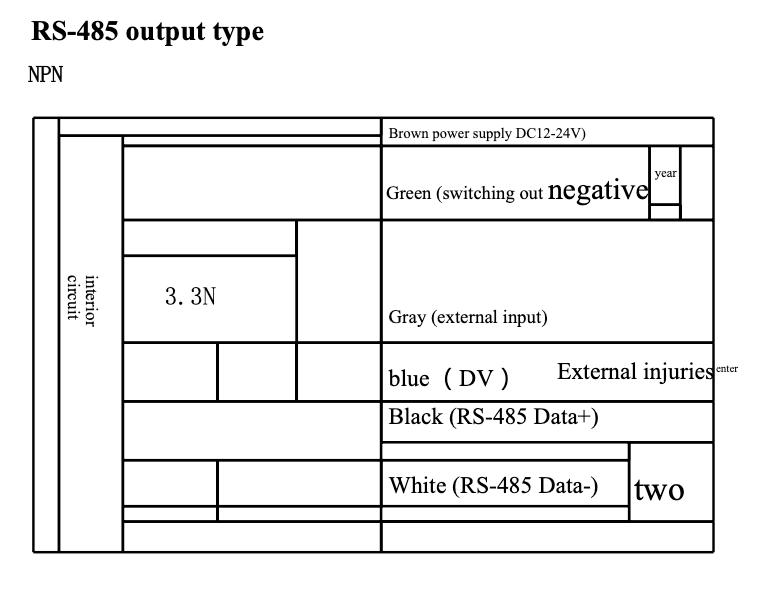
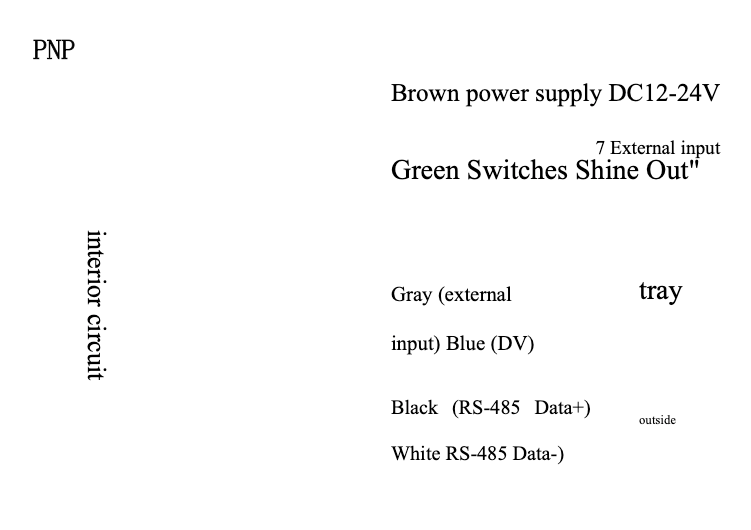
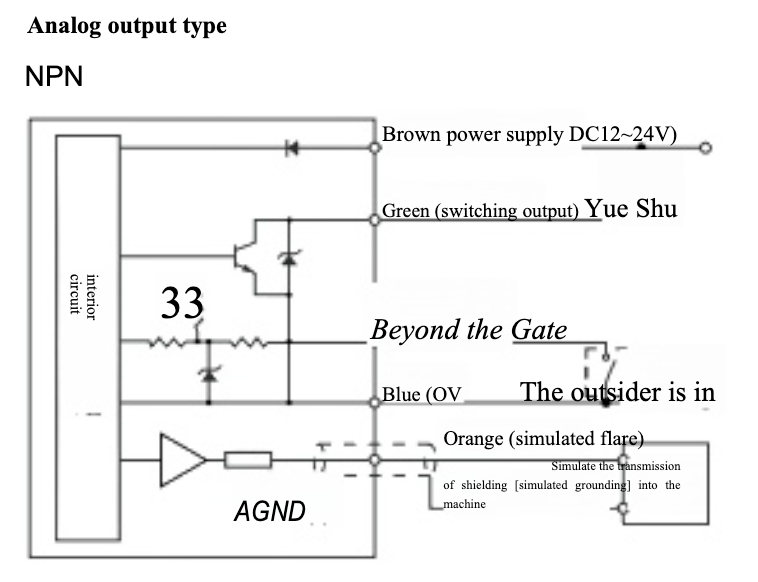
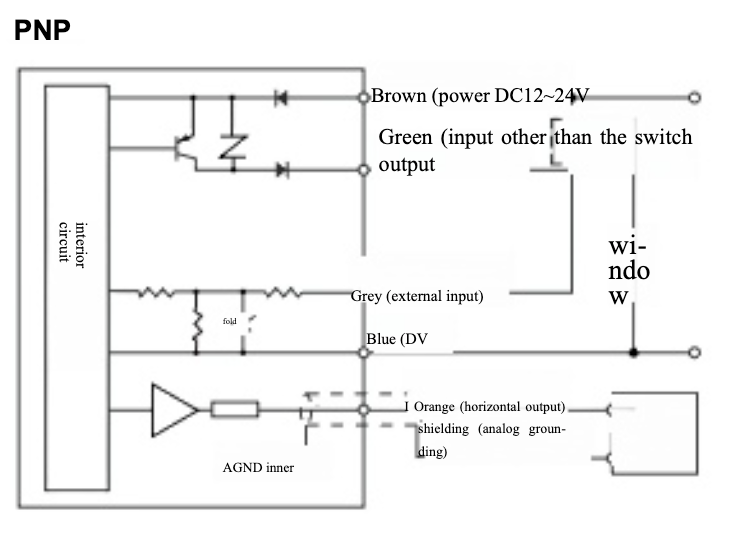
Product wiring diagram
Product dimensions